- Host
- WU-HOUSE-PC
- Status
- CHECKING
Overview
Everything here runs on one (strong-ass) PC at the house. If you ever need a reference, this guide tells you how to get your devices connected, how to setup the tools, how to use the tools, and things to watch out for.
What it is: a free app that assigns your phone or laptop to our own private family network with the house server. Every device in the group is given an additional IP address (unique within the family group) that allows them to communicate with each other no matter where you are. Once your device is in the group (aka Tailnet), the server behaves exactly as if we were at home connecting over LAN.
Why it matters: the server isn't on the public internet, so a stranger can't just type in an address and find it. Tailscale is the door, and only invited devices get through so we can rest assured knowing our data is private and nobody outside the family (unless I allow it) can access the server. It also means nothing breaks if the server changes location — the addresses follow the machine, not the building.
Setting it up:
That's it. Leave it on and forget about it; it sits in the background, doesn't impact normal usage, and takes up almost nothing in the way of device memory and/or power consumption.
NOTE: you may see a VPN active symbol on your phone, this is normal and won't affect anything else.
What it is: a private ChatGPT-style assistant. Everything you type and receive in chats is stored privately on Wu-House-PC's SSD. No subscription, no usage limits, no company reading our data.
Setting it up:
Web search and Code Interpreter are toggles in the bottom left corner of the chat box ("Integrations" button). Off by default, so turn it on when you need their functionality; works on every model.
Uploading images only works with the vision model (see below). The others will ignore any uploaded image.
File Generation: these models don't have the advanced tools commercial LLMs do to generate complex files (like powerpoints, pdfs, images, etc.), but there is a workaround if you ask it to generate a python program that creates the file for you. Any code files it generates for you can be found in the notes tab (left side-panel) on the user interface.
There's a dropdown menu on the bottom right corner of the chat to select a model. They differ in what they're good at.
| Model | Use it for |
|---|---|
| qwen3.6-27b(this is original model we determined was best on hugging face, David) | Everyday default. General questions, writing, explaining things.CONTEXT WINDOW: 90,000 tokens / ~67,000 words — use this for long chats or outputs |
| qwen3.8-27b | Updated version of qwen3.6. Slightly sharper and more accurate answers, but slightly slower. Worth it when quality matters more than speed. Quantized to 5-bits (Q5).CONTEXT WINDOW: 32,768 tokens / ~25,000 words |
| qwen3.8-vision | The only one that can see images. Upload a photo, screenshot, or diagram and ask about it. Otherwise similar to 3.8, but slightly lower fidelity (Q4).CONTEXT WINDOW: 32,768 tokens / ~25,000 words |
| qwen3-coder-30b | Writing and debugging code. Noticeably faster than the others and efficient for coding specifically, but not the best for all other use cases.CONTEXT WINDOW: 32,768 tokens / ~25,000 words |
| deepseek-distill-32b | Hard problems that need step-by-step reasoning — math, logic, puzzles, etc. Largest model size so less room in memory for kv-cache, slowest.CONTEXT WINDOW: 16,384 tokens / ~12,000 words |
The server can only hold one model in memory (VRAM) at a time. Switching means unloading one and loading the next one in from the hard drive (the models are 16-20GB each), which takes 20–30 seconds before you get your first word back.
This is normal and not a malfunction, but if you flip between models on every prompt, you'll spend most of your time waiting.
This same wait time happens on the very first question after someone's been streaming a remote desktop/gaming session, or after the server restarts. After that, the last model used will stay loaded on the card indefinitely (until it is evicted by another model or someone starts gaming).
NOTE: the models think out loud so you can choose to view the full thought process before it gives a final response.
If you ever need to run a process, application, or game that is compute-heavy/graphics-intensive, stream the server desktop to your device remotely and take advantage of its powerful GPU! This is basically free Geforce NOW but without the wait time; I remember us dealing with wait times when trying to game at home over the holidays so I hope this will be useful for us (mostly me and Alex probably). Two ways in:
Install Moonlight — free, find it on your app store or go to that link.
Set screen resolution and bitrate accordingly if there are latency/speed issues. The bottleneck is usually your internet (the client receives much more data than it sends), but could be the server's problem if the wifi at home is especially shitty one day.
That's it, you're logged in automatically — no password, no setup. Good for a quick session or running a large program.
NOTE: significantly worse quality than the moonlight app. For gaming, use Moonlight app.
Latency and Speed also depend on distance. While the main factor is how good your wifi is, how close you are to home/the server also determines how well it performs. If we're at home or within a 2 hour drive, it should run even better than Geforce NOW. Otherwise, it'll be comparable or slower.
One person at a time. I have yet to configure the GPU to partition VRAM across multiple games (would theoretically be able to run two average games well or 1 intense game well and 1 other game shittily). If you guys want that feature I can try to add it, but I doubt we'll ever need it.
You can use your own Steam account. You're seeing the real desktop, so just log out of Steam and log into yours normally (or play my games).
Not every game works. Some MMO games — like Counter Strike, Fortnite, etc — won't run on this setup because linux disallows anti-cheat software on the OS kernel level. Don't think this will matter because you guys don't play that gay stuff.
Gaming pauses the AI. If someone tries to prompt the AI while someone else is gaming, the chat will display a message saying it's unavailable. That's deliberate — both need the same graphics card. If you need the AI, text whoever's playing and tell them to stop.
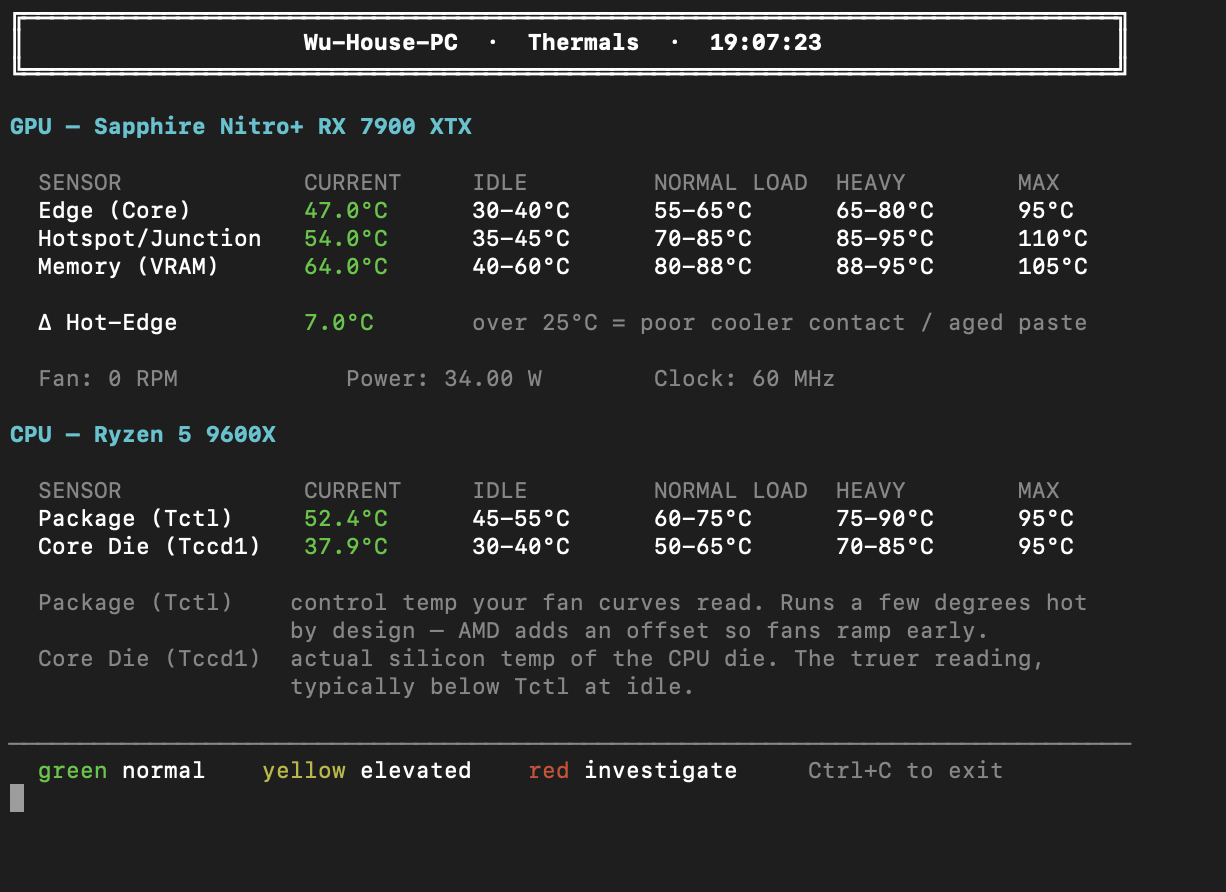
A live terminal reading of how hot the server is running (both CPU and GPU). Click the card on the landing page with Tailscale on. It's read-only so you can look, but can't break anything even if you tried.
Mostly useful for me, but handy if you're curious how hard the machine is working while you're using it. I set up temperature ranges and a color code to determine if:
Let me know if you ever see red.
The status light in the top right corner is real, not just cosmetic. Wu-House-PC checks in with this website every 60 seconds, so green means the machine is currently online, and red means it's offline — either powered off, restarting, or crashed. If it's red there is nothing to fix on your end; none of the services will work until it comes back. If the light is ever green but the services don't work, let me know.
If something ever doesn't load, check Tailscale first. Nine times out of ten the answer is that Tailscale got switched off. Fully sign out and back in if toggling doesn't fix it — a plain refresh sometimes isn't enough.
The server restarts by itself sometimes. There's a known bug in the graphics driver that occasionally freezes the machine (Ubuntu 26.04 distro of Linux OS is not yet optimized for AMD hardware); I set up a 2 layer failsafe to detect that and reboot itself within a minute or two—same applies if there is a power outage at home. All services auto-start on system boot up so everything should come back on its own.
We can add other people if we want. Mia is set up (mostly to help me with testing), and I'm happy to add Jenna and Sooyoung (if they care/want to use the AI or remote computing services, maybe not lol). There is a 6-seat limit on the Tailnet however, so up to us to determine if Mom and Dad are more likely to use it or them.
If a game is running slowly: Try lowering the resolution in Moonlight's settings, but if you're halfway across the world then it may just be very slow regardless(haven't tested that yet).
I've never needed to use Linux besides a few systems classes at Northwestern and setting this up; most people never need to use it day to day but if you're curious: